Organ Section
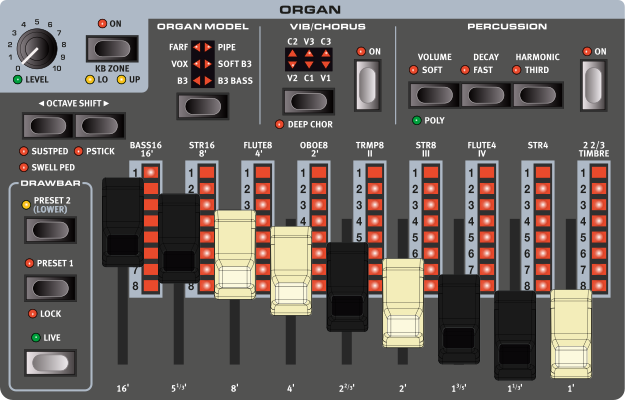
The Nord Electro 7 features six organ models, all digitally modeled; a tonewheel/B3 organ with a separate B3 Bass mode, two transistor organs (Vox and Farfisa), Soft B3 and Pipe Organ models.
ON/OFF AND KB ZONE
The Organ Section is turned On or Off by pressing its ON button.
Press KB ZONE (Shift+On), to assign the Organ to the Lower (LO), Upper (UP) or Lower and Upper keyboard zones. When assigned to both keyboard zones, PRESET 2 is assigned to Lo while PRESET 1 and the DRWB LIVE drawbars are assigned to Up, allowing for dual manual Split setups.
With the B3 BASS Organ Model selected, the two bass drawbars are assigned to the Lower zone/Preset 2, with a standard B3 manual being available on the Upper zone, corresponding to Preset 1 and Drwb Live.
The Program section KB SPLIT function is turned on automatically when operating the KB Zone settings. Read more about KB Split, split points and keyboard zones.
A secondary keyboard can be attached to the Nord Electro 7 using MIDI and set to control one of the Organ manuals using the AUX KB functionality.
LEVEL
The LEVEL control determines the output level of the Organ section.
The LEVEL LED indicates whether an attached Expression Pedal or the Modulation Wheel controls the Organ volume level or not. Note that Organ Swell is a separate function, activated by pressing Shift+Octave Shift down.
Read more about how to assign the Expression Pedal and Modulation Wheel in the Program Section reference guide
OCTAVE SHIFT
Use OCTAVE SHIFT ◀︎ / ▶︎ to transpose the Organ up or down by octaves (+/- 12 semitones). When assigned to the entire keyboard it can be transposed one octave up or down. With a keyboard split being active, each keyboard zone can be transposed individually, always giving access to the entire range of the organ regardless of the size of the keyboard zone.
SUSTPED
SUSTPED (Shift+Octave Shift Down) activates any attached sustain pedal for the selected Organ Layer. Read more on how to configure an attached pedal in the Menus chapter, on page 44.
SELECTING AN ORGAN MODEL
Use the ORGAN MODEL selector button to select an Organ Model to use. Read more about each Organ Model further down.
DRAWBARS AND PRESETS
The mechanical drawbars are accompanied by LED graphs, showing the settings for a focused PRESET.
PRESET 1 AND 2
PRESET 1 and PRESET 2 provide two independent drawbar settings, useful for switching between two distinct sounds during a performance.
When a KB Split is active and the Organ is assigned to both the Lower and Upper sides of the split, Preset 2 is assigned to Lower and Preset 1 (and Drwb Live) to Upper.
LOCK
Preset 1 can be locked, by pressing Shift+Preset 1, which activates the LOCK LED. This is useful for scenarios where you want to be able to prepare drawbar settings before switching to Drwb Live from a preset.
DRWB LIVE
With DRWB LIVE selected, the LED graphs are unlit and the physical positions of the drawbars are used. A program can be stored with Drwb Live active, allowing for that program to be loaded with the physical drawbar positions being instantly used.
SWELL PEDAL
Swell is a characteristic organ feature, controlled from a continuous pedal. Swell is not only a volume control – for the B3 model it also makes the sound softer, by reducing the mid range presence, at low swell levels.
To use Swell control on the Nord Electro 7, make sure the [EXP PED] LED next to the LEVEL control is lit, activated by pressing SHIFT or EXP PEDAL ASSIGN in the Program Section and turning the Organ LEVEL control.
An attached Expression Pedal can be configured in the Pedal Menu (see page 44).
Like on the original instrument, the Swell pedal does not lower the volume all the way to zero when in B3 or B3 Bass mode.
THE B3 MODEL
The B3 model is based on the classic electro-mechanical tonewheel organ. This simulation utilizes innovative and advanced methods to capture every nuance of the original sound. Here are some examples:
- An extremely accurate capture of the original chorus and vibrato scanner
- Modeling of the individual contact bounces for each harmonic
- Modeling of the unique frequency characteristics of the built-in pre-amplifier, which forms the “body” of the sound
- Simulation of the energy robbing on the tone wheels that results in the typical “compressed” sound
- Authentic tuning of the tonewheels according to the original design.
- Extremely fast keyboard response
- Full polyphony.
B3 DRAWBARS
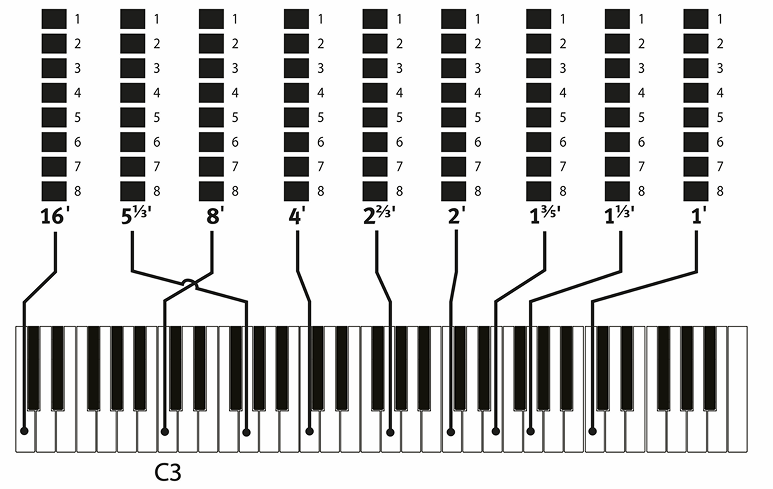
The harmonic intervals for the tonewheel organ are printed on the panel below the drawbars. Each drawbar represents a partial with a fixed harmonic interval in relationship with the played note.The illustration below shows the pitch interval among the nine drawbars when the key of C3 is played. Note that the 5 ⅓′ drawbar actually is a 5th above the fundamental harmonic (8′) but in most situations is perceived as sounding below it.
VIBRATO & CHORUS
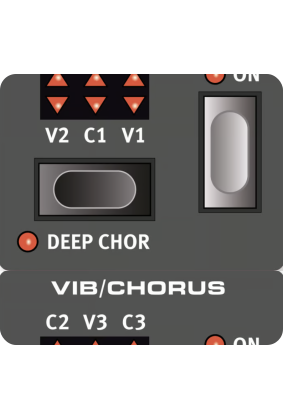
The original vibrato and chorus scanner in a tonewheel organ consists of a modulated delay line in combination with a rotating scanner. For the Vibrato effect, phase shift is applied to the signal. For the Chorus effect, the phase-modulated signal is added to the original signal. Three different types of choruses (C1-C3) and three different types of vibratos (V1-V3) are available. Select one of these types by pressing the Vibrato/Chorus selector button.
DEEP CHORUS
The DEEP CHOR (Deep Chorus, Shift+Vibrato/Chorus) setting increases the modulation amount of the Chorus effect. The non-Deep and Deep Chorus settings correspond to early and late eras of the original design.
PERCUSSION
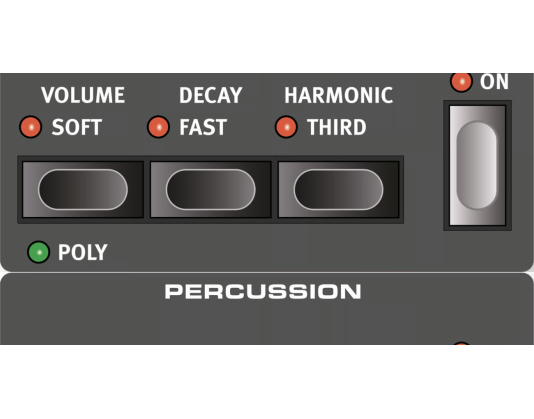
Press the PERCUSSION ON button to add an extra attack to the B3 sound by having a single envelope generator controlling either the 2nd or 3rd harmonic. The envelope “opens up” for a short moment at the beginning of the sound when you press the key(s). Normally, the percussion is a single-triggered non-legato effect. By “single-triggered” we mean that the percussion is only present when you hit the keys when no other note is sounding.
In other words, if you play a note or a chord and then add more notes without releasing the previously pressed keys, there will be no percussion effect in the new notes. You have to release all keys to be able to play new notes with the percussion effect.
In POLY mode (Shift+Volume), the Percussion is polyphonic, producing the percussive attack on each new stroke, regardless of how many keys are already pressed down.
The VOLUME SOFT button toggles between Normal and Soft percussion level. The DECAY FAST button toggles between Slow and Fast decay times.
The HARMONIC THIRD button toggles between using the 2nd or 3rd partial as the source for the percussion effect.
The Percussion effect is only available for the B3 organ model.
THE VOX MODEL
The original Vox™ organ is probably the most famous of all the transistor based combo organs that emerged in the early 60’s. Transistor technology made it possible to manufacture compact and portable organ instruments. Compared to the mighty sound of tonewheel based organs, transistor organs generally sounded reedier and weaker, but this one had a distinctive sound character which together with the portability made the instrument massively popular at the time.
VOX DRAWBARS
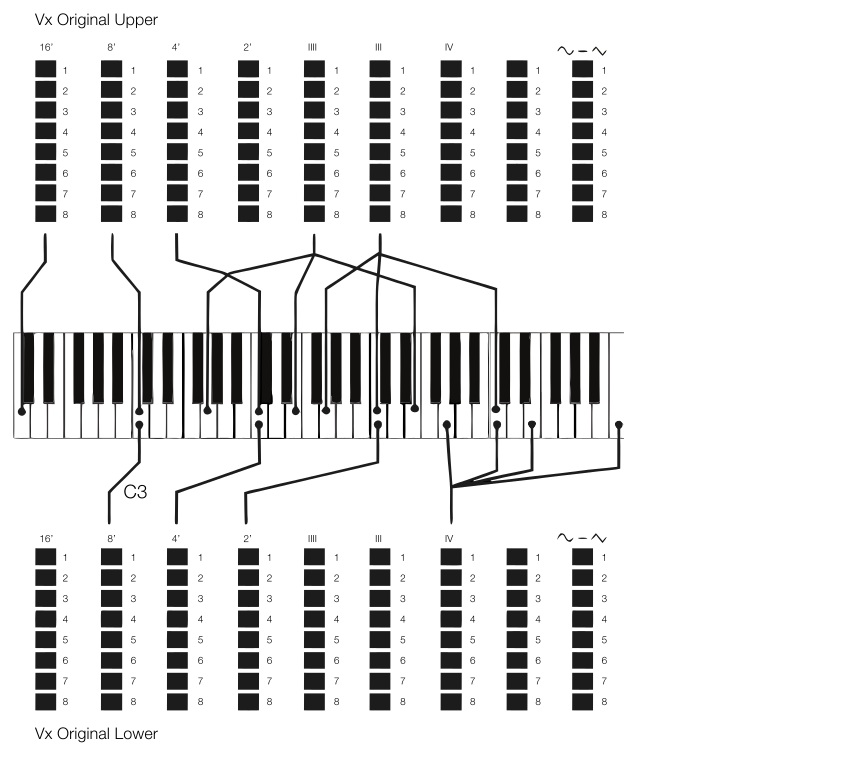
The labels used for the Vox drawbars are printed on the row directly above the drawbar LEDs.
For basic drawbar operation, please refer to “Drawbars and LED Graphs” on page 15.The seven drawbars to the left control the level of each partial. Each partial has a fixed harmonic interval relating to the played note. The illustration below shows the pitch interval of the drawbars when the key of C3 is played.
The rightmost drawbar controls the mix between a filtered signal sounding soft and dark, and an unfiltered signal sounding bright and intense.
VIBRATO
There are several types of vibrato and choruses available for the Vox model, which is activated using the ON button in the Vibrato section. The V3 setting is the one that is modeled after the original instrument.
THE FARF MODEL
The typical “buzzy” sound of this vintage instrument is one of the most distinct and easily recognizable organ sounds ever created; yet it is actually possible to get quite a wide range of sounds out of the instrument. Note that the voices aren’t supposed to replicate the instruments they are named after, but rather to describe the basic tonal characteristic of the voice: Flute = soft, Oboe = reedy, Trumpet = brassy etc.
FARF REGISTERS
The labels used for the FARF drawbars/registers are printed on the upper row, above the drawbar LEDs or drawbars.
The drawbars act as on/off switches, or “register selectors” when the Farf model is selected. Instead of drawbars, the original instrument used rocker switches for selecting instrument voices (in reality different filter settings) in various footage (octave) ranges. Drawbar LEDs 5-8 are lit up for an activated voice, and drawbar LEDs 1-4 are lit up for a deactivated voice. Pulling a drawbar more than half way out will activate that register.
The table below shows the original register name.
| DRAWBAR | VOICE | PANEL NAME |
|---|---|---|
| 1 | Bass 16 | BASS16 |
| 2 | Strings 16 | BASS16 |
| 3 | Flute 8 | FLUTE8 |
| 4 | Oboe 8 | OBOE8 |
| 5 | Trumpet 8 | TRMP8 |
| 6 | Strings 8 | STR8 |
| 7 | Flute 4 | FLUTE4 |
| 8 | Strings 4 | STR4 |
| 9 | A bright voice, an octave and a fifth above the fundamental | 2 2/3 |
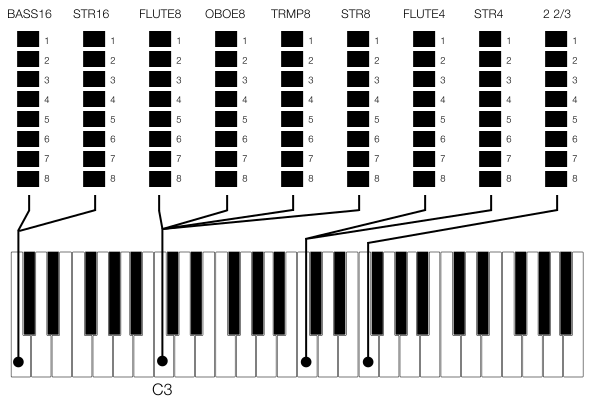
The illustration shows the pitch interval between each voice when the key of C3 is played. Though some voices have the same pitch, they differ in tonal character.
VIBRATO
The original instrument has two basic vibrato modes; “Light” and “Heavy”, with different rates for each mode. There are several types of vibrato and choruses available for the Farf model on the Nord Electro 7, which are activated using the ON button in the Vibrato section.
The V1, V2 and the C3 settings are the ones that are modeled after the original instrument’s.
SOFT B3
For scenarios where a B3-like sound is desired, but without the keyboard click and other artifacts, the SOFT B3 is an appropriate choice. The drawbars correspond exactly to those of the B3 model.
With the Soft B3 selected the B3 Percussion has no effect on the sound.
PIPE ORGAN
The PIPE organ model faithfully recreates a principal pipe section – the sets of metal pipes, or ranks, that commonly make up the backbone of a pipe or church organ. While other ranks may attempt to recreate the sounds of other instruments (flutes, trumpets, strings etc.) the principal sound is non-imitative and unique to the pipe organ.
The pipe lengths available for the Pipe models correspond to those of the B3 model, ranging from 16 feet to 1 foot.
PIPE VIBRATO/CHORUS
Activating VIBRATO/CHORUS for the Pipe organ switches to a model which is tuned with less precision. This produces chorus-like effects, slight dissonances and adds realism when combining registers.
ROTARY SPEAKER
The Rotary Speaker settings are described in detail in the Effects chapter